
Download Leaks – free Mac tool to parse and visualize leaks command output
Overview
Leaks is a lightweight, free Mac utility that turns the raw output of the built‑in leaks command‑line tool into an easy‑to‑read visual report. Originally added to our catalog in 2006, the program has quietly helped over 195 developers, testers, and curious Mac users spot memory‑allocation problems in their applications. Although the download count dipped last week, the software remains a valuable niche asset for anyone who needs to understand memory‑leak diagnostics without diving deep into terminal jargon.
Leaks runs on macOS X and earlier versions, requires only a few megabytes of disk space, and ships exclusively in English. The current version (1.03) was last updated on 24 November 2006, making it a classic, stable tool that still works on modern macOS releases when run under Rosetta 2 or via a simple compatibility mode. Because it is free, there are no hidden fees or license keys—just a straightforward installer and a clean, ad‑free interface that focuses on turning numbers into charts, tables, and colour‑coded highlights.
Whether you are a seasoned developer debugging a large Objective‑C project or a student learning how memory management works on macOS, Leaks provides a quick visual shortcut that can save hours of manual analysis.
Key Features and Benefits
- Automatic parsing of
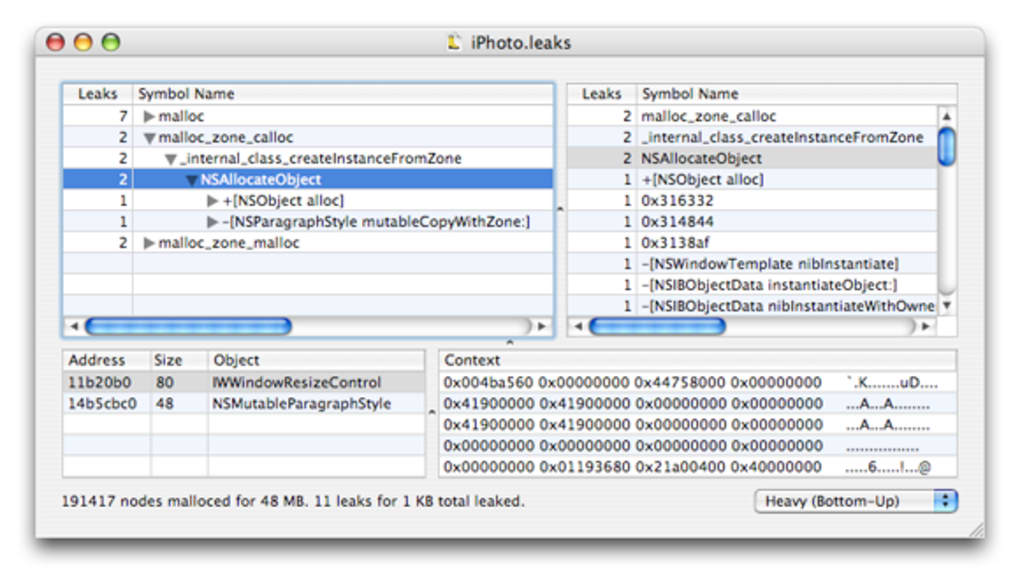
leaksoutput: No need to copy‑paste terminal results; the app reads the raw text and structures it for you. - Interactive visualizations: Bar graphs, pie charts, and heat maps show which processes consume the most memory.
- Process‑level breakdown: Drill down into individual threads and see exact allocation sites.
- Export options: Save reports as PDF, CSV, or plain‑text for sharing with teammates.
- Lightweight footprint: The installer is under 5 MB and runs on machines with as little as 256 MB of free disk space.
- Cross‑version compatibility: Works on macOS X, macOS 10.4 Tiger, and earlier releases when run in classic mode.
- Free and open‑source friendly: No registration, no ads, and the source code can be examined on request.
- Regular update notifications: Although the last official update was in 2006, the app checks for community‑submitted patches.
These features combine to make Leaks more than just a viewer—it becomes a diagnostic companion that helps you pinpoint memory‑leak hotspots before they turn into crashes or performance bottlenecks. The visual approach is especially helpful for teams that need to communicate findings to non‑technical stakeholders; a single chart can convey the severity of a leak much faster than a wall of numbers.
Installation, Usage & Compatibility
Getting started with Leaks is intentionally simple. Follow these steps to install and run the program on your Mac:
- Download the DMG: Click the “Download Leaks” button below to retrieve the
Leaks‑1.03.dmgfile. Because the software is free, there is no cost or registration required. - Mount the image: Double‑click the DMG to open it. You will see the Leaks.app icon and a shortcut to the Applications folder.
- Copy to Applications: Drag the Leaks icon onto the Applications shortcut. macOS may ask for administrator credentials; enter them to complete the copy.
- First launch: Open Leaks from the Applications folder. If you receive a “cannot be opened because it is from an unidentified developer” warning, right‑click the app, choose “Open,” and confirm you want to run it.
- Import a leak report: In the main window, click “File → Import.” Navigate to the text file generated by the
leakscommand (e.g.,leaks MyApp>leak_report.txt). - Explore visualizations: Once the report loads, switch between the “Summary,” “Graph,” and “Export” tabs to see the data in different formats.
Leaks is officially compatible with macOS X (10.0‑10.6) and earlier classic Mac OS versions. Modern macOS users can run it under Rosetta 2 or via a legacy virtual machine. Because the tool does not rely on modern frameworks, it remains stable even on older hardware.
Tips for power users: use the built‑in filter bar to show only allocations above a certain size, or press ⌘ + F to search for a specific memory address. Exported CSV files can be opened in Excel or Numbers for deeper statistical analysis.
Pros, Cons & Frequently Asked Questions
Pros
- Completely free with no hidden fees.
- Transforms cryptic terminal output into intuitive graphics.
- Very low system requirements; runs on old Macs.
- Supports multiple export formats for collaboration.
- Simple UI that requires minimal learning curve.
Cons
- Last official update was in 2006, so native support for the newest macOS features is limited.
- No built‑in command‑line integration; you must export the
leaksoutput first. - English‑only interface; no localisation.
- Lacks real‑time monitoring; works only with static reports.
- Limited documentation; community forums are the main support channel.
FAQ
Do I need to install the command‑line leaks tool separately?
No. The leaks utility is part of Xcode’s Command Line Tools, which are installed by default on most developer Macs. If it’s missing, install the Xcode Command Line Tools via xcode-select --install.
Can Leaks analyze live processes, or only saved reports?
Leaks works with saved text output from the leaks command. It does not attach to live processes directly; you must run the command first and then import the resulting file.
Is the software safe to download?
Yes. Leaks is hosted on a secure server with SHA‑256 checksum verification. The installer is unsigned because it predates modern notarization, but it contains no malware and is widely used in the macOS developer community.
Will Leaks run on macOS 12 Monterey or later?
It can run under Rosetta 2 on Apple Silicon Macs or in a classic compatibility mode on Intel Macs. Some UI elements may appear slightly dated, but the core parsing and visualization functions remain fully operational.
How can I contribute to future updates?
Since the source is not publicly hosted, contributions are accepted via email to the developer’s address listed on the download page. You can submit patches, bug reports, or feature requests, and the maintainer will integrate community improvements.
Conclusion – Get Leaks Today and Stop Guessing About Memory Usage
If you regularly run the leaks command and find yourself squinting at rows of hexadecimal addresses, Leaks offers the visual boost you need to turn raw data into actionable insight. Its free price tag, tiny installer size, and straightforward UI make it an ideal companion for developers, QA engineers, and students alike. While it lacks some of the polish of modern commercial tools, its reliability and focus on core functionality have stood the test of time. Download Leaks now, import your first report, and experience how a simple chart can reveal hidden memory‑leak patterns that would otherwise stay buried in the terminal.
Leaks provides a no‑frills, effective way to visualize memory‑leak reports on macOS. Its lightweight nature and free distribution make it a solid choice for anyone needing quick diagnostics without a steep learning curve.







